Error History
Category: Errors · Widget ID: errors.history
What it shows
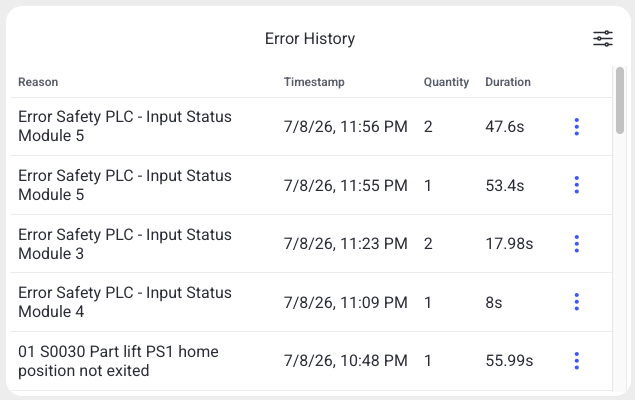
A chronological list of recent errors for the selected machine, newest first.
Data and refresh
- Data source: Reports API.
- Time range: Respects the selected time period (aggregated over the whole window).
- Machine filter: Respects the selected machine(s).
- Widget locks: You can lock this widget to its own machine and/or time range (Machine lock / Time lock) so it ignores the dashboard filters. See Custom Dashboard.
Configuration
Open the slider menu, then select Configure. The Configure button shown in an empty widget opens the same dialog.
| Setting or action | Choices and default | Effect |
|---|---|---|
| Filter mode | All messages (default), Selected messages only | Includes all errors or only selected machine/message-code pairs. |
| Search messages | Search text | Finds messages for the current machines. Select results with their checkboxes. |
| Selected messages | Expand/collapse list; remove entries; Deselect all | Reviews and changes the selection. Each entry identifies its machine, text and code. |
| Confirm / Close | Apply / discard | Applies the local filter or leaves the previous configuration unchanged. |
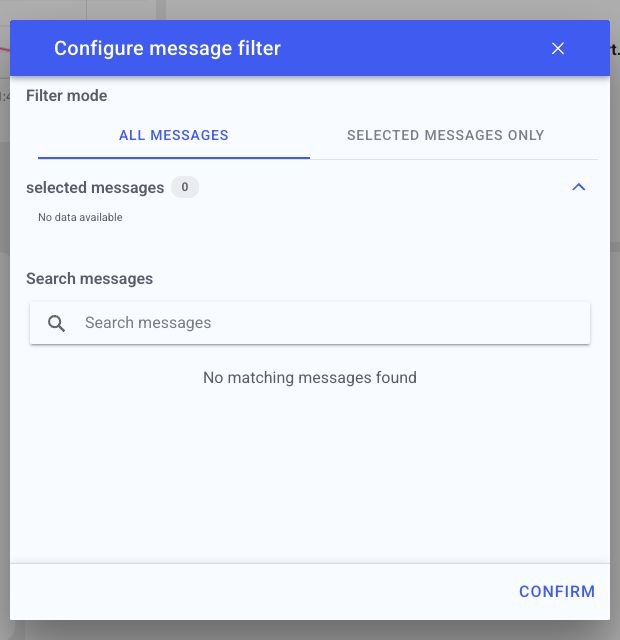
The example has no matching messages because the demo machine has no message history. The selection is local to the widget and does not edit the machine's Ignore Messages settings. There is no page-size or sorting control in this dialog. Load more remains a widget interaction. Machine/time locks are in the widget menu.
How to read it
Use this list to review which errors occurred and when. For older periods, a row can summarize occurrences in a time bucket rather than show the exact timestamp of an individual error. Counts remain available after detailed event data has expired. A bucket at the edge of a selected time range may also include activity just outside the exact boundary.
Interactions
- Analyze — open the message analysis popup for the selected message (see Analyze Message Popup).
- Help — open matching guidance suggestions for the message.
- Ignore — mark this message code as ignored for its machine (requires permission). This affects historical error views beyond this widget; it is not a local display filter. See Ignore message behavior.
- Load more — load additional rows beyond the first page.
- Widget filter (top-right icon) — change top-N, message scope, and display.
Screenshot
Troubleshooting
Widget shows no data -> No events in the selected machine/period, or a filter is too narrow -> Widen the time range or change the machine, then refresh once -> If a machine that normally reports data stays empty, use Troubleshooting > Connectivity.